
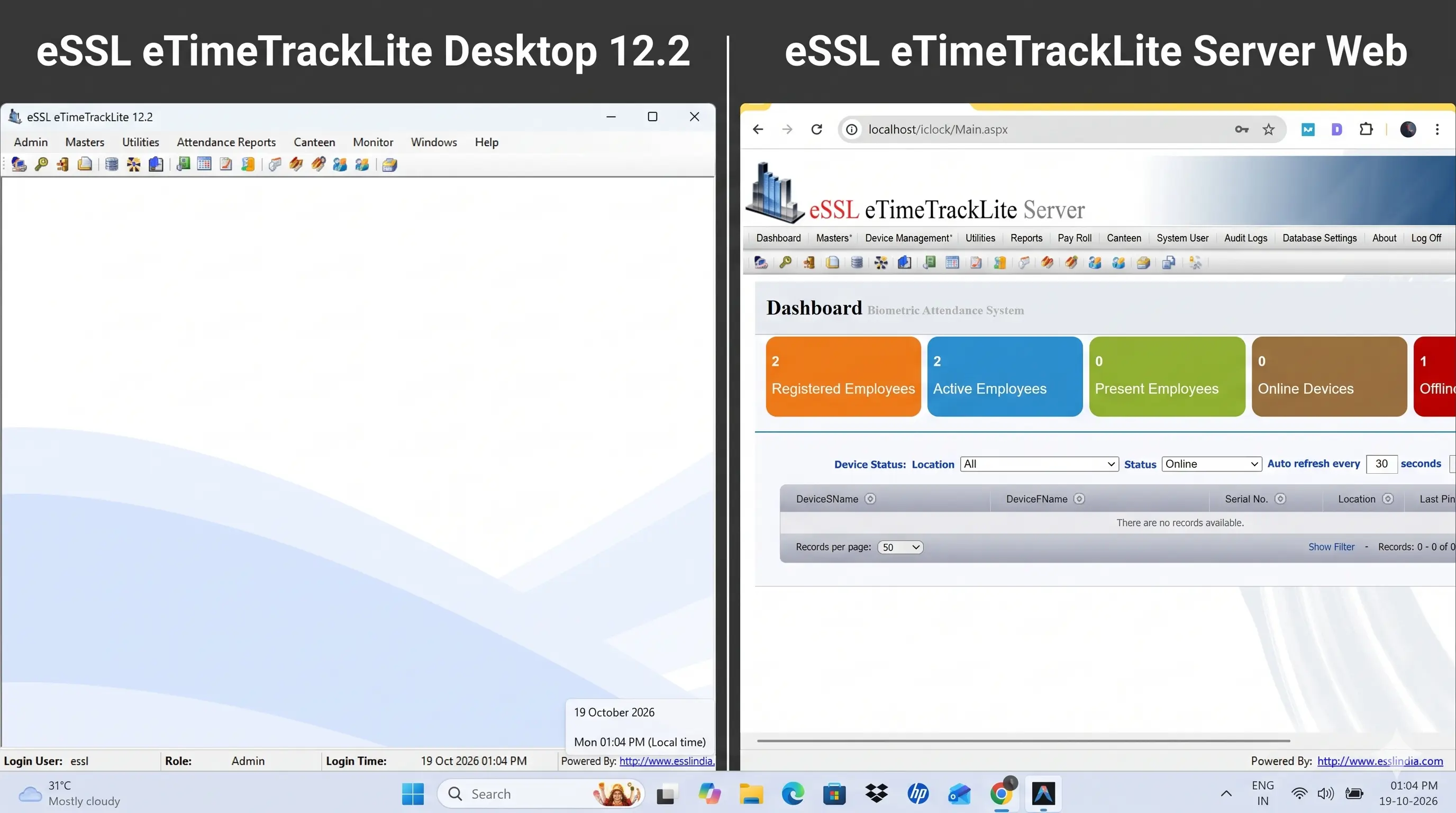
Choosing the right attendance management software determines whether your biometric system runs smoothly or creates daily administrative headaches. Discover the architectural, operational, and financial differences between eSSL eTimeTrackLite Desktop and Web editions—and learn exactly which one fits your organization.
The 30-Second Executive Summary
- • Choose eTimeTrackLite Desktop (₹1,000): If you run a single office, retail store, or factory with 10 to 150 employees where one HR manager processes attendance on a local computer. Simple, reliable, zero IIS configuration.
- • Choose eTimeTrackLite Web (₹2,500): If you manage multiple branches across different cities, employ 50 to 5,000+ staff, require concurrent access for department managers, need mobile access, or want an Employee Self-Service (ESS) portal for leave requests and approvals.
Both editions are genuine one-time commercial purchases with Lifetime Valid with Activation Code from Eye Tech Securities.
The eSSL Biometric Dilemma: Desktop vs. Web
Thousands of Indian enterprises, manufacturing plants, educational institutions, and corporate offices rely on eSSL biometric attendance devices (such as the Identix K21, K30, SilkBio-101TC, MB160, and UFace series) for daily employee punch tracking. However, while the physical biometric device records fingerprints and facial recognition punches, the real business intelligence happens inside the management software: eSSL eTimeTrackLite.
When deploying or upgrading attendance systems, business owners and IT managers face a pivotal question: "Should we install eTimeTrackLite Desktop Edition or deploy the eTimeTrackLite Web Application Server?"
Choosing the incorrect software edition often results in frustrating operational roadblocks—such as HR managers unable to access attendance reports from home, multi-branch punch synchronization failures, database file corruption in multi-user setups, or paying unnecessary server maintenance fees. Below is an exhaustive breakdown of both platforms to ensure you invest in the exact solution your organization requires.
Deep Dive: eSSL eTimeTrackLite Desktop Edition
eTimeTrackLite Desktop is the classic, standalone Windows GUI executable
(eTimeTrackLite.exe) designed to run natively on a local workstation or dedicated PC
running Windows 10, Windows 11, or Windows Server.
1. Architecture & Database Engines
The Desktop application connects directly to its database via ODBC / OLEDB drivers. It supports two primary database configurations:
- Microsoft Access (
.mdb): Suitable only for small micro-businesses (under 50 employees) with a single biometric machine. While convenient to initialize, MS Access files are notoriously prone to database lockups, slow query times, and catastrophic file corruption if multiple users attempt concurrent read/writes. - Microsoft SQL Server (2012 through 2022 / Express): The enterprise standard for Desktop deployment. SQL Server delivers robust relational data integrity, automated transaction logs, and support for thousands of employee records without data corruption.
2. Device Communication & Data Syncing
In a Desktop setup, biometric devices must communicate directly with the host PC over the local area
network (LAN) using Ethernet TCP/IP or WiFi. The background synchronization service
(eTimeTrackServerService.exe) continuously polls connected biometric terminals on port
4370
to pull raw punch logs into the local database table (DeviceLogsProcessed).
Key Advantages of Desktop Edition:
- • Zero Web Server Complexity: No requirement for IIS (Internet Information Services), SSL certificates, or open public IP ports.
- • Lightning-Fast Local Operations: Generating monthly salary registers, muster rolls, and shift reports executes instantaneously on local hardware.
- • Budget-Friendly: One-time genuine software license is only ₹1,000 (Lifetime Valid with Activation Code) for a single computer.
- • Offline Standalone Capability: Functions flawlessly even without active internet access, provided devices and PC are connected via a local switch.
Notable Limitations of Desktop Edition:
- • Single Workstation Lock-in: The software can only be operated from the physical computer where it is activated. Multi-user concurrent access requires individual client installations.
- • No Employee Self-Service (ESS): Staff members cannot check their punch times, view leave balances, or request regularization online.
- • Multi-Branch Complications: Connecting devices located in distant branch offices requires complex router port-forwarding, static public IPs at every branch, or dedicated VPN tunnels.
Deep Dive: eSSL eTimeTrackLite Web Application Edition
eSSL eTimeTrackLite Web is a modern, enterprise-grade browser application hosted on Microsoft IIS (Internet Information Services) with ASP.NET and backed by a Microsoft SQL Server database. It allows unlimited authorized users to log in securely from Google Chrome, Microsoft Edge, or Safari on any computer, laptop, or mobile tablet.
1. Multi-Branch Centralization & ADMS Push Protocol
Unlike Desktop software which must actively "poll" devices, eTimeTrackLite Web utilizes the ADMS (Automatic Data Master Server) Cloud Push protocol. Biometric devices equipped with LAN, WiFi, or 4G SIM cards across Chennai, Bangalore, Mumbai, or overseas automatically push attendance punches in real time over HTTP/HTTPS to the central Web Server URL.
2. Granular Role-Based User Access
With the Web Application, organizations are no longer dependent on a single overworked HR administrator. The system supports multi-tier role-based permissions:
- Super Administrator: Full control over company settings, shift schedules, device assignments, and payroll exports.
- Branch HR / Admin: Can view, manage, and process attendance only for their designated branch office.
- Department HOD / Manager: Can review daily attendance, approve shift swaps, and authorize overtime for their team members.
3. Employee Self-Service (ESS) Portal
Perhaps the biggest productivity booster of the Web Application is the built-in Employee Self-Service (ESS) module. Every enrolled employee receives individual web credentials to:
- View live daily punch in and punch out times with status (On-Time, Late, Early Exit).
- Check available casual, sick, and earned leave balances in real time.
- Submit online leave applications and On-Duty (OD) slips.
- Request punch corrections if they forgot to swipe, which automatically routes to their reporting manager for one-click approval.
Key Advantages of Web Application Edition:
- • Centralized Real-Time Sync: Multi-branch devices stream punches into one single SQL database instantly.
- • Access Anywhere, Any Device: HR and business directors can review attendance from home, airport, or branch offices via browser.
- • Zero Client Software Installation: Branch PCs and HR laptops do not require software installation; simply open a browser tab.
- • Automated Leave Workflows: Eliminates paper leave slips, email chains, and manual muster roll reconciliations.
- • High ROI: Genuine server license is only ₹2,500 (Lifetime Valid with Activation Code).
Technical Considerations for Web Edition:
- • Requires Server Environment: Must be hosted on a dedicated PC or Windows Server with IIS enabled and Microsoft SQL Server installed.
- • Network Configuration: Requires static IP or domain pointing with port forwarding (typically port 80 / 443 / 8080) for external branch sync.
Side-by-Side Comparison Matrix
To help you quickly evaluate the technical specifications and operational differences, consult the comprehensive comparison table below:
| Feature / Specification | eTimeTrackLite Desktop Edition | eTimeTrackLite Web Application |
|---|---|---|
| Software Architecture | Windows Native GUI Executable (.exe) | Microsoft IIS Web Application (.NET) |
| Supported Databases | MS Access (.mdb) or MS SQL Server | Microsoft SQL Server (2012 to 2022) |
| User Interface | Installed Desktop Window | Modern Web Browser (Chrome, Edge, Safari) |
| Concurrent Administrative Users | 1 User per installed workstation | Unlimited simultaneous role-based users |
| Multi-Branch Centralization | Requires VPN / Complex Port Forwarding | Native ADMS Cloud Push Protocol |
| Employee Self-Service (ESS) | No (Manual email/paper) | Yes (Online leave & punch view) |
| Remote / Work-from-Home Access | Requires AnyDesk to host PC | Direct browser login from anywhere |
| Device Compatibility | All eSSL & ZKTeco TCP/IP & USB models | All eSSL & ZKTeco Cloud Push / ADMS models |
| Hardware Resource Overhead | Minimal (Any standard dual-core PC) | Moderate (Quad-core PC/Server, 8GB+ RAM) |
| Salary & Payroll Report Exports | Excel, PDF, CSV, Text | Excel, PDF, CSV, Automated Email reports |
| Genuine Software License Price | ₹1,000 (Single PC Activation) | ₹2,500 (Central Server Activation) |
| License Validity | Lifetime Valid with Activation Code | Lifetime Valid with Activation Code |
| Professional Remote Setup Support | ₹1,500 (Software setup with MS Access Database) | ₹3,500 (Software Setup with IIS and SQL Server) |
| Ideal Business Profile | Single office, 10–150 employees | Multi-branch, 50–5,000+ employees |
"Who Needs Which?" - Practical Decision Framework
Still uncertain which edition best matches your business workflow? Use this straightforward decision checklist:
Choose Desktop If:
Single Location • ₹1,000- You operate a single office, retail showroom, clinic, school, or workshop.
- Your total workforce is between 5 and 150 employees located in one building.
- A single HR admin or accountant handles attendance reports directly at their designated office desk.
- Your biometric attendance machines connect over the local office WiFi or Ethernet switch.
- You want the simplest, fastest deployment with zero web server setup costs.
Choose Web If:
Multi-Branch • ₹2,500- You manage multiple branch offices, retail chains, factories, or client sites across Chennai or India.
- Your organization has 50 to 5,000+ employees across different departments and shifts.
- Multiple HR coordinators, branch heads, and department managers need simultaneous login access.
- You want employees to view their own punches and submit online leave applications (ESS portal).
- Biometric machines communicate via GPRS, 4G SIM, or remote internet without local PCs.
Can You Upgrade from Desktop to Web Later?
Yes, absolutely. Many growing companies begin with eTimeTrackLite Desktop when operating from a single location, and later upgrade to the Web Application as they expand with new branches.
Because both applications share an underlying relational data model, your employee master profiles, registered fingerprints, biometric face data, shift matrices, and historical attendance logs can be migrated seamlessly into the Web Application database schema.
The Golden Rule for Future-Proofing: Always configure eTimeTrackLite Desktop with Microsoft SQL Server 2022 Express instead of MS Access. Upgrading from SQL Server Desktop to SQL Server Web is a straightforward database restore procedure taking less than 30 minutes, whereas converting from MS Access requires manual CSV re-importation.
Need Genuine eSSL eTimeTrackLite License Keys?
Get 100% official genuine activation codes with Lifetime Valid with Activation Code. Instant digital delivery via WhatsApp within 5 minutes. Remote installation support via AnyDesk available across India.
Related Technical Guides & Solutions
Explore our engineering and biometric troubleshooting guides to maximize the efficiency of your attendance systems:
- eSSL Biometric Parallel Database Integration: A step-by-step T-SQL trigger and Python script architecture to mirror raw biometric punch logs into 3rd-party ERPs and payroll software in real time without locking eTimeTrackLite.
- Emergency eSSL Biometric Admin Affirm Unlock Tool (₹750): Locked out of your biometric device menu? Bypass "Admin Affirm" in 5 minutes using our dynamic algorithmic master password generator without losing employee fingerprints or punch logs.
- Biometric Attendance System Supply & Installation: Explore genuine eSSL and ZKTeco attendance devices, facial recognition terminals, and complete access control hardware deployment across Chennai.
- Eye Tech Securities CCTV & Security Packages: Complete home, commercial, and enterprise security camera installation packages in Chennai with lifetime technical guidance.
Frequently Asked Questions
🔗 Looking for the Best CCTV Camera & Biometric Attendance Installation in Chennai? We provide genuine hardware, professional setup, and dedicated technical support across Tamil Nadu.
👉 View our CCTV Camera & Biometric Security Packages & Prices
About Eye Tech Securities
Eye Tech Securities is a certified electronic security and biometric systems integrator based in Chennai, Tamil Nadu. We specialize in commercial biometric attendance automation, access control systems, CCTV surveillance, and official genuine eSSL eTimeTrackLite software licensing with pan-India remote deployment.