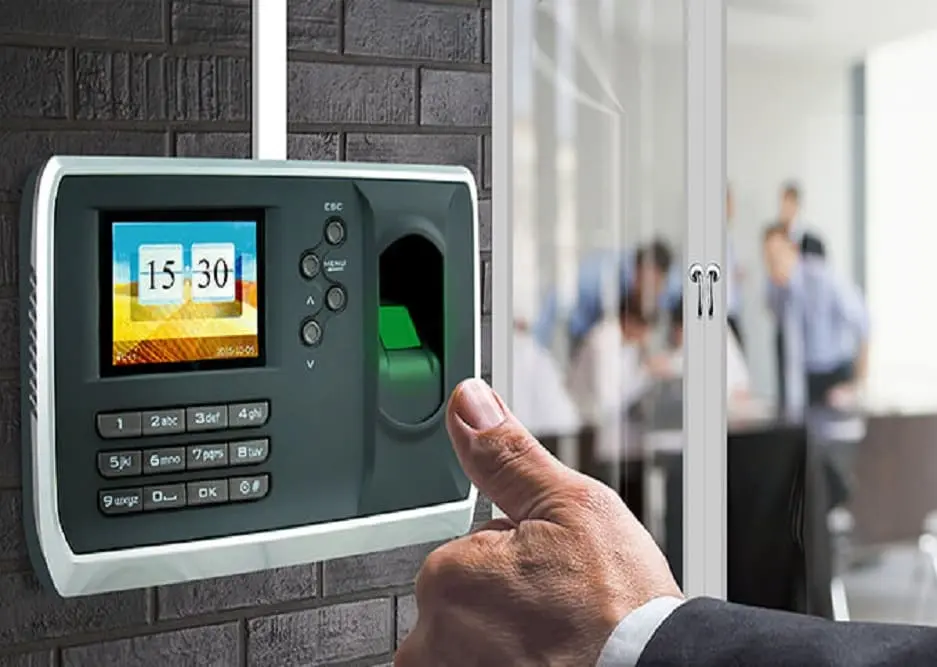
Integrating biometric attendance hardware with enterprise business software—such as SAP ERP, Tally Prime, Zoho People, GreytHR, Keka, or custom in-house HRMS web applications—is one of the most critical requirements for growing organizations. However, connecting your business software directly to the primary eSSL eTimeTrackLite database frequently leads to severe operational lockups.
When external software runs heavy payroll queries, monthly reconciliation reports, or continuous polling loops directly against the live eSSL database, it triggers shared table locks, deadlocks, and connection pool starvation. As a result, the eSSL real-time communication service freezes, biometric terminals disconnect across branches, and live employee punches are dropped.
In this technical guide, our biometric engineering team at Eye Tech Securities outlines the industry gold-standard solution: The Parallel Database (Staging Sync) Pattern. You will learn the exact database schema, non-blocking T-SQL replication triggers, micro-batch stored procedures, and lightweight worker scripts required to achieve a 100% crash-resilient biometric integration.
Why Use a Parallel Database?
- Zero Table Locks: eTimeTrackLite writes raw biometric records with zero latency while 3rd-party software queries an isolated secondary staging table.
- Safe Sandboxing: External developers and ERP vendors get restricted credentials with no read/write access to employee biometric templates or core license data.
- Idempotent Processing: Unprocessed punch records are cleanly flagged (
IsProcessed = 0/1), enabling instant replay, auditing, and fault recovery. - Multi-Branch Scalability: Seamlessly aggregates punch records from LAN IP devices, Wi-Fi terminals, and remote 4G GPRS push devices into one unified feed.
1. Understanding the eSSL eTimeTrackLite Database Model
eSSL biometric devices (manufactured by ZKTeco and OEM partners) communicate with Windows client machines and servers using proprietary ZK protocols over TCP port 4370 or via HTTP/HTTPS push (ADMS / IClock protocol over ports 80 or 8088). The official application—eTimeTrackLite (Desktop or Web)—processes these raw packets and stores them in a relational database.
While small offices with a single standalone fingerprint machine might initially start on a local .mdb MS Access file, scalable multi-user setups utilize Microsoft SQL Server (2014, 2017, 2019, or 2022 Express/Standard) with the primary catalog named eTimeTrackLite1.
Within this database, device transactions land in two main tables:
- DeviceLogs_Processed: The primary repository for cleaned, validated raw punches ready for calculation (Columns:
DeviceLogId, DownloadDate, DeviceId, UserId, LogDate, Direction, WorkCode). - DeviceLogs_MM_YYYY (e.g. DeviceLogs_10_2026): Monthly partitioned historical raw punches used for archiving.
- Employees: Master employee registry containing
EmployeeId, EmployeeCode, EmployeeName, DepartmentId, CardNumber.
Critical Pitfall: Why Direct ERP Queries Cause Failure
When a 3rd-party ERP polls SELECT * FROM DeviceLogs_Processed every few seconds, SQL Server's storage engine acquires Shared (S) locks. When the eSSL Realtime Service simultaneously attempts to write fresh employee punches from terminals using Exclusive (X) locks, lock escalation causes Deadlock Error 1205. The eSSL service drops the TCP socket connection, stops downloading logs, and locks the machine screen until manually restarted.
2. The Parallel Database Architecture Explained
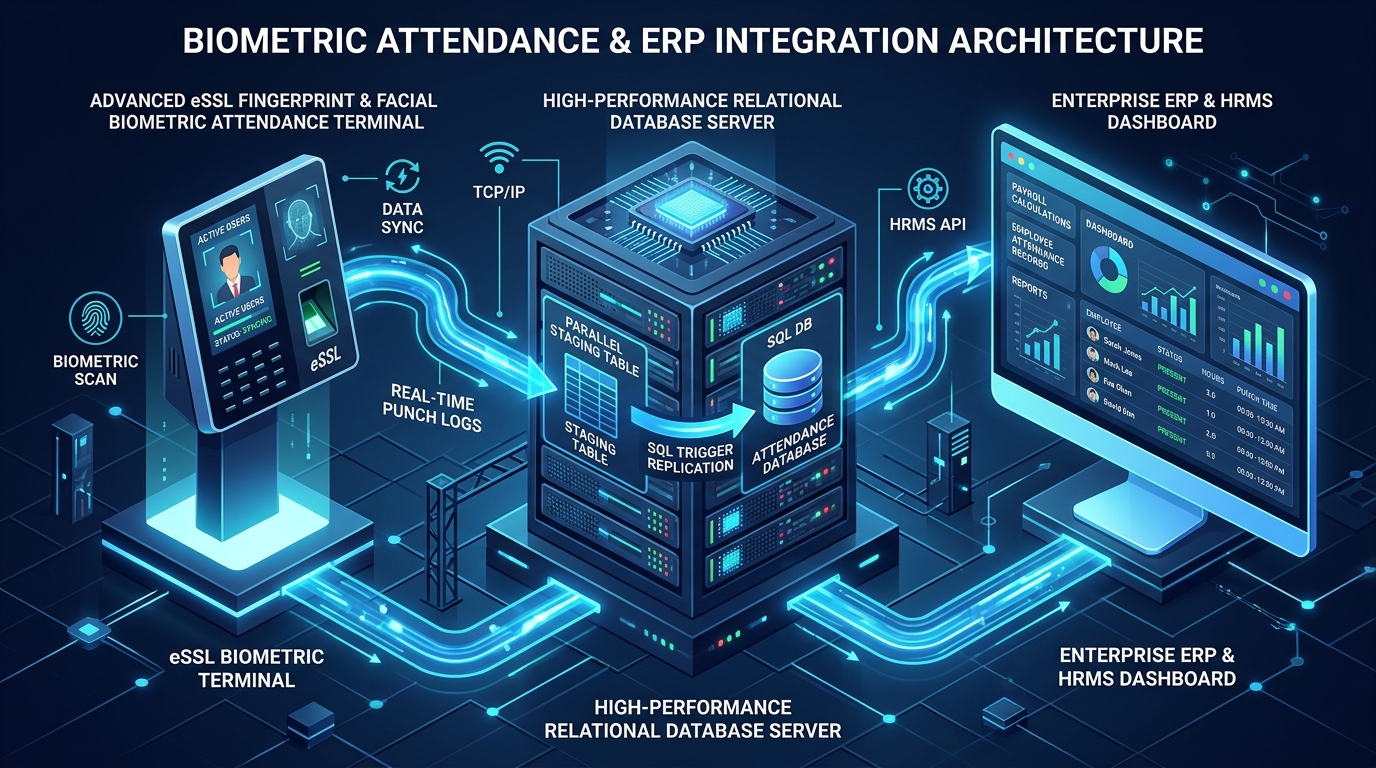
The Parallel Database pattern solves concurrency contention by decoupling log ingestion from business consumption. Here is how the high-performance data pipeline functions:
- Terminal Push/Poll: Biometric fingerprint and face recognition terminals transmit raw punch events to the central eTimeTrackLite Service.
- Primary Write: eTimeTrackLite commits the record to
eTimeTrackLite1.dbo.DeviceLogs_Processedinside micro-second transactions. - Instant Replication: An optimized, asynchronous SQL trigger or a lightweight scheduled Agent micro-batch mirrors essential columns (
UserId, LogDate, DeviceId, Direction) into an independent database calledERP_BiometricParallelDB. - Queue Consumption: 3rd-party ERPs, payroll software, or Python/Node.js API daemons connect exclusively to
ERP_BiometricParallelDB. They select unread rows, execute business validation, push to the ERP ledger, and mark the rows asIsProcessed = 1.
Because the ERP only reads and writes to the parallel database, the live biometric terminal engine remains 100% isolated, running at maximum speed without deadlocks or latency.
Need eSSL eTimeTrackLite Desktop or Web License Key?
Already have an eSSL biometric fingerprint or face attendance machine but need the software activated after a system crash, new PC migration, or purchasing on Amazon/Flipkart? We provide official genuine eSSL eTimeTrackLite Desktop & Web License Keys (Desktop from ₹1,000 • Web from ₹2,500) with Lifetime Valid with Activation Code and Instant WhatsApp Delivery in 5 Minutes.
Get eSSL eTimeTrackLite License Key Online3. Step-by-Step Implementation Blueprint
💻 Step 1 – Create the Parallel Staging Database & Queue Table
Open SQL Server Management Studio (SSMS) on your biometric database server and execute the following T-SQL script to instantiate the isolated parallel container:
USE master;
GO

-- 1. Create Dedicated Parallel Integration Database
IF NOT EXISTS (SELECT name FROM sys.databases WHERE name = 'ERP_BiometricParallelDB')
BEGIN
    CREATE DATABASE ERP_BiometricParallelDB;
END
GO

USE ERP_BiometricParallelDB;
GO

-- 2. Create the Staging Queue Table
IF OBJECT_ID('dbo.ERP_AttendanceStagingQueue', 'U') IS NULL
BEGIN
    CREATE TABLE dbo.ERP_AttendanceStagingQueue (
        StagingId           BIGINT IDENTITY(1,1) PRIMARY KEY,
        SourceDeviceLogId   BIGINT NOT NULL,
        EmployeeEnrollId    VARCHAR(50) NOT NULL,
        PunchTime           DATETIME NOT NULL,
        DeviceId            INT NOT NULL,
        PunchDirection      VARCHAR(20) NULL, -- In, Out, Auto, Break
        DeviceSerialNumber  VARCHAR(50) NULL,
        IsProcessed         TINYINT NOT NULL DEFAULT 0, -- 0=Pending, 1=Success, 2=Error
        ProcessedAt         DATETIME NULL,
        ErrorMessage        VARCHAR(255) NULL,
        ERP_TransactionRef  VARCHAR(100) NULL,
        CreatedDate         DATETIME NOT NULL DEFAULT GETDATE()
    );

    -- 3. Composite Index for High-Speed ERP Polling
    CREATE NONCLUSTERED INDEX IX_Staging_IsProcessed_PunchTime
    ON dbo.ERP_AttendanceStagingQueue (IsProcessed, PunchTime)
    INCLUDE (SourceDeviceLogId, EmployeeEnrollId, DeviceId, PunchDirection);

    -- 4. Unique Constraint to prevent duplicate punch mirroring
    CREATE UNIQUE NONCLUSTERED INDEX UQ_Staging_SourceLog
    ON dbo.ERP_AttendanceStagingQueue (SourceDeviceLogId);
END
GO
⚡ Step 2 – Deploy the Non-Blocking SQL Replication Trigger
Now, attach an ultra-lean AFTER INSERT trigger onto eTimeTrackLite1.dbo.DeviceLogs_Processed. This trigger executes in sub-millisecond time and wraps its logic in a TRY...CATCH block to ensure that even if the parallel database is momentarily offline, the core biometric software will never encounter a write error.
USE eTimeTrackLite1;
GO

CREATE OR ALTER TRIGGER trg_MirrorDeviceLogsToParallelDB
ON dbo.DeviceLogs_Processed
AFTER INSERT
AS
BEGIN
    SET NOCOUNT ON;

    BEGIN TRY
        -- Fast insert into parallel staging table without holding locks
        INSERT INTO ERP_BiometricParallelDB.dbo.ERP_AttendanceStagingQueue (
            SourceDeviceLogId,
            EmployeeEnrollId,
            PunchTime,
            DeviceId,
            PunchDirection,
            DeviceSerialNumber,
            IsProcessed,
            CreatedDate
        )
        SELECT
            ins.DeviceLogId,
            LTRIM(RTRIM(ins.UserId)),
            ins.LogDate,
            ISNULL(ins.DeviceId, 0),
            CASE
                WHEN ins.Direction = 'in' THEN 'IN'
                WHEN ins.Direction = 'out' THEN 'OUT'
                ELSE 'AUTO'
            END,
            d.DeviceSerialNumber,
            0, -- Pending
            GETDATE()
        FROM inserted ins
        LEFT JOIN dbo.Devices d WITH (NOLOCK) ON ins.DeviceId = d.DeviceId
        WHERE NOT EXISTS (
            SELECT 1
            FROM ERP_BiometricParallelDB.dbo.ERP_AttendanceStagingQueue q WITH (NOLOCK)
            WHERE q.SourceDeviceLogId = ins.DeviceLogId
        );
    END TRY
    BEGIN CATCH
        -- Graceful degradation: never fail the primary insert
    END CATCH
END;
GO
🏭 Step 3 – Alternative: Scheduled Micro-Batch Sync (For High-Volume Factories)
For large manufacturing facilities in industrial corridors like Sriperumbudur, Guindy, or Ambattur where hundreds of workers swipe within seconds during shift changes, high trigger frequency can accumulate thread locks. In such environments, use a scheduled SQL Server Agent job that executes every 30 to 60 seconds instead:
USE ERP_BiometricParallelDB;
GO

CREATE OR ALTER PROCEDURE dbo.usp_SyncNewBiometricLogsMicroBatch
AS
BEGIN
    SET NOCOUNT ON;

    DECLARE @LastSyncedLogId BIGINT;
    SELECT @LastSyncedLogId = ISNULL(MAX(SourceDeviceLogId), 0)
    FROM dbo.ERP_AttendanceStagingQueue WITH (NOLOCK);

    -- Read in batches of 500 using uncommitted dirty read to avoid blocking
    INSERT INTO dbo.ERP_AttendanceStagingQueue (
        SourceDeviceLogId,
        EmployeeEnrollId,
        PunchTime,
        DeviceId,
        PunchDirection,
        IsProcessed,
        CreatedDate
    )
    SELECT TOP (500)
        dl.DeviceLogId,
        LTRIM(RTRIM(dl.UserId)),
        dl.LogDate,
        ISNULL(dl.DeviceId, 0),
        UPPER(ISNULL(dl.Direction, 'AUTO')),
        0,
        GETDATE()
    FROM eTimeTrackLite1.dbo.DeviceLogs_Processed dl WITH (NOLOCK)
    WHERE dl.DeviceLogId > @LastSyncedLogId
    ORDER BY dl.DeviceLogId ASC;
END;
GO
🔌 Step 4 – Building the 3rd-Party Consumer Worker (Python / REST API Integration)
Now, your external ERP or custom web dashboard connects exclusively to ERP_BiometricParallelDB. Below is a production-grade Python integration daemon that fetches new batches, invokes an external ERP REST API (e.g., SAP, Zoho People, or custom payroll), and safely commits status flags:
import time
import pyodbc
import requests

# 1. Connect EXCLUSIVELY to Parallel Staging DB with restricted credentials
DB_CONFIG = (
    "DRIVER={ODBC Driver 18 for SQL Server};"
    "SERVER=localhost;"
    "DATABASE=ERP_BiometricParallelDB;"
    "UID=erp_sync_user;"
    "PWD=SecurePassword2026!;"
    "TrustServerCertificate=yes;"
)

ERP_API_ENDPOINT = "https://api.yourcompanyerp.com/v1/attendance/punch"
ERP_AUTH_TOKEN = "Bearer eyJhbGciOiJIUzI1NiIsInR5cCI6IkpXVCJ9..."

def process_biometric_queue():
    conn = pyodbc.connect(DB_CONFIG, autocommit=False)
    cursor = conn.cursor()

    try:
        # Fetch top 50 pending records with row-level locks
        cursor.execute("""
            SELECT TOP 50 StagingId, EmployeeEnrollId, PunchTime, DeviceId, PunchDirection
            FROM dbo.ERP_AttendanceStagingQueue WITH (UPDLOCK, READPAST)
            WHERE IsProcessed = 0
            ORDER BY StagingId ASC
        """)
        rows = cursor.fetchall()

        for row in rows:
            staging_id, emp_id, punch_time, device_id, direction = row

            payload = {
                "employee_code": emp_id,
                "punch_timestamp": punch_time.strftime("%Y-%m-%d %H:%M:%S"),
                "device_id": device_id,
                "direction": direction
            }

            # Transmit payload to 3rd-Party ERP REST API
            response = requests.post(
                ERP_API_ENDPOINT,
                json=payload,
                headers={"Authorization": ERP_AUTH_TOKEN},
                timeout=10
            )

            if response.status_code in (200, 201):
                erp_ref = response.json().get("transaction_id", "OK")
                cursor.execute("""
                    UPDATE dbo.ERP_AttendanceStagingQueue
                    SET IsProcessed = 1,
                        ProcessedAt = GETDATE(),
                        ERP_TransactionRef = ?
                    WHERE StagingId = ?
                """, (erp_ref, staging_id))
            else:
                cursor.execute("""
                    UPDATE dbo.ERP_AttendanceStagingQueue
                    SET IsProcessed = 2,
                        ErrorMessage = ?
                    WHERE StagingId = ?
                """, (response.text[:250], staging_id))

        conn.commit()
    except Exception as ex:
        conn.rollback()
        print(f"[ERROR] Sync failure: {ex}")
    finally:
        conn.close()

if __name__ == "__main__":
    print("eSSL Biometric Parallel DB Sync Daemon Running...")
    while True:
        process_biometric_queue()
        time.sleep(5)  # Poll every 5 seconds
4. Production Edge Cases & Best Practices
A. Debouncing Duplicate Employee Punches
Employees frequently place their finger or face on the terminal multiple times within a few seconds (e.g., verifying if the green light flashed). If all 3 punches reach the ERP, the system might calculate accidental lunch-break toggles or overtime errors.
Solution: Implement a 60-second debounce filter in your consumer logic or SQL trigger so punches from the same employee within 60 seconds are discarded:
-- Exclude punches for the same employee within 60 seconds
AND NOT EXISTS (
    SELECT 1 FROM dbo.ERP_AttendanceStagingQueue prev WITH (NOLOCK)
    WHERE prev.EmployeeEnrollId = ins.UserId
      AND prev.PunchTime >= DATEADD(second, -60, ins.LogDate)
      AND prev.PunchTime <= ins.LogDate
)
B. Multi-Location Offices & 4G GPRS Push Hardware
For companies with distributed branches across Chennai, Coimbatore, Madurai, or Pan-India, hardware uses ADMS / IClock HTTP Push to transmit punches over 4G SIM cards or local broadband to a centralized cloud IP.
When a remote branch loses internet connectivity, the biometric device buffers up to 50,000 punches in its internal flash memory. When connectivity restores, all 500 punches arrive simultaneously in out-of-order chronological bursts. The parallel database architecture absorbs this sudden influx easily because the staging queue writes synchronously without locking the ERP API.
Locked Out of Your Biometric Device Menu?
Need to access device network settings for database configuration? Use our instant eSSL Admin Password Reset Tool to bypass admin lock without losing employee templates.
C. Database Housekeeping: Auto-Purging Old Staging Logs
Because the parallel staging queue is an operational transaction conduit and not a historical archive, keeping millions of processed records slows index scans. Schedule a weekly SQL maintenance job to purge processed logs older than 90 days:
USE ERP_BiometricParallelDB;
GO

-- Delete processed records older than 90 days
DELETE FROM dbo.ERP_AttendanceStagingQueue
WHERE IsProcessed = 1
  AND CreatedDate < DATEADD(DAY, -90, GETDATE());
GO
5. Frequently Asked Questions (FAQ)
Can we implement a Parallel Database with eTimeTrackLite Desktop on MS Access (.mdb)?
While MS Access supports basic ODBC linked tables, it lacks native AFTER INSERT triggers, multi-threaded connection pooling, and row-level locking. For reliable ERP integration, we strongly advise migrating eTimeTrackLite Desktop to Microsoft SQL Server 2019/2022 Express (which is free from Microsoft). Eye Tech Securities provides complete database migration assistance.
Does this architecture work with all eSSL, ZKTeco, and Realtime biometric models?
Yes. As long as your biometric devices feed into eTimeTrackLite (Desktop or Web), this parallel staging mechanism works universally across all fingerprint, face recognition, palm, and RFID card terminals, including eSSL K30, K90, SilkBio-101TC, MB160, UFace series, and ZKTeco terminals.
How are punch directions (IN vs OUT) handled if staff don't press direction buttons?
Most modern offices configure devices in Auto Mode (direction defaults to AUTO). Your ERP consumer daemon can implement First-In / Last-Out calculation logic: the earliest punch of the day for an employee is marked as IN, and the latest punch before midnight is treated as OUT.
Can Eye Tech Securities configure this parallel database integration remotely for our company?
Yes. Eye Tech Securities provides end-to-end technical support across India. Our senior database engineers configure Microsoft SQL Server 2022 Express, deploy the parallel staging database and non-blocking triggers, and assist your software developers with API integration via secure AnyDesk or UltraViewer sessions.
🔗 Looking for the Best CCTV Camera Installation Services in Chennai? We provide expert support for all brands.
👉 View our CCTV Camera Packages & Prices