Authorized CCTV Camera dealer in Chennai
Authorized Hikvision Partner • Remote Technical & Fast Streaming Solutions

Hikvision Remote Password Reset, Unbind & Fast Streaming Setup

Authorized Hikvision Partner providing 5 specialized remote services: Password Reset (5–10 mins), Hik-Connect Device Unbind, Router Reconfiguration, High-Speed Static IP Live Streaming, and Multi-Branch Centralized Viewing on a single screen across Tamil Nadu & all of India. No invoice needed & backed by our 100% Refund Guarantee.

Serviceable Across Tamil Nadu & All India
5–10 Mins Fast Turnaround
No Invoice Needed
100% Refund Guarantee If Not Done
Changed Internet Reconfiguration
High-Speed Static IP Streaming
Multi-Branch Single Screen View
Authorized Hikvision Partner
Fixed Transparent Fee
₹450 / Per Device

Same procedure & fee for Password Reset, Hik-Connect Unbind, OR Internet Change Reconfiguration

100% Refund Guarantee If Not Done
Looking for Faster Streaming or Multi-Branch Monitoring? We provide custom Static IP configurations for faster live video than P2P and multi-site single screen monitoring. Contact us on WhatsApp for details!
Payment Should Be Made Before Itself (100% Protected)

As per company protocol, the service charge of ₹450/device must be paid in advance via UPI (GPay/PhonePe/Paytm) before our technician starts the Ultraviewer remote session. Backed by our 100% Refund Guarantee if not resolved!

Comprehensive Remote Solutions

Our 5 Specialized Remote Hikvision Services

Whether you need forgotten passwords unlocked, offline router connections repaired, Static IP streaming configured for faster viewing than P2P, or multiple branch DVRs brought onto a single screen — we provide complete remote solutions across Tamil Nadu and all of India.

Category 1

Remote Unlocking & Device Reconfiguration (₹450 / Device)

Hikvision Password Reset

₹450 / Device

Forgotten admin password or lost pattern on your DVR, NVR, or IP camera? We generate the official cryptographic reset file to unlock your system.

  • Unlocks admin menu and restores full password access
  • All hard disk recordings and channel settings remain 100% safe
  • Supports all Turbo HD DVRs, Network Recorders & IP Cameras
Reset Password via WhatsApp

Hik-Connect Account Unbind

₹450 / Device

Hik-Connect app shows: "The device has been added to another account"? We unbind the device from the old account so you can link it to your own phone app.

  • Fixes "Device has been added to another account" instantly
  • Ideal for rented properties, pre-owned DVRs, or lost mobile logins
  • Same simple procedure & same fixed charges: ₹450 / Device
Unbind Device via WhatsApp

Changed Internet Reconfiguration

₹450 / Device

Changed your Wi-Fi router, replaced your fiber modem, or switched Internet provider (Airtel, JioFiber, ACT, BSNL) and your DVR went offline? We reconfigure network settings to bring your mobile app back online.

  • Fixes "Offline" status on Hik-Connect app after router or ISP changes
  • Reconfigures IP address, default gateway, and DNS servers remotely
  • Restores mobile live view and playback in 5–10 minutes via UltraViewer
Fix Offline DVR via WhatsApp
Category 2

High-Speed Live Streaming & Multi-Branch Centralization

Static IP Live Streaming Setup

⚡ Faster Than P2P

Frustrated by slow camera feeds, spinning "loading" circles, or video delay on Hik-Connect? We configure your Hikvision system to stream directly through your Static IP address for faster, smoother live viewing than standard cloud P2P.

  • Faster Connection than P2P: Cameras connect and open noticeably faster without long waiting times
  • Smoother Live Video: Direct stream provides consistent video without cloud P2P stutter or frame drops
  • Reliable Mobile & PC Viewing: Watch direct camera feeds on smartphones, laptops, and office monitors
  • No Technical Hassle: Our certified engineers configure everything remotely via UltraViewer
Get Streaming Setup

Multi-Branch Centralized Monitoring

🖥️ Single Central Static IP

Own multiple shops, clinics, offices, or warehouses? You might already know about multi-branch viewing via cloud P2P or having Static IP on each branch. Our solution is different and far more economical: Single Static IP in your centralized PC location only!

How Our Solution Compares to Existing Methods:
Method 1: Multi-Branch Viewing via Cloud P2P
Sluggish, frequent video buffering, low frame rate, and often times out when streaming multiple branch cameras simultaneously.
Method 2: Static IP on Each Branch
Extremely costly! Forces you to pay heavy recurring monthly Static IP rental charges to your ISP at every single branch location.
Eye Tech Solution: Single Static IP in Centralized PC Location
Only ONE Single Static IP needed at your Central Monitoring PC location! All your branch locations use normal, existing broadband or Wi-Fi (no Static IP needed at branches). You get faster and smoother live viewing than P2P on a single screen, saving huge recurring monthly ISP fees!
  • Single Static IP in Central PC Location: No need for Static IP at each branch. Only the centralized monitoring PC requires a Static IP.
  • Branches Use Regular Internet: All your branch shops, clinics, or godowns run on regular everyday broadband or Wi-Fi (no Static IP needed at branches).
  • Zero Port Forwarding at Branches: Branch DVRs connect outward directly to your central PC, eliminating firewall headaches and router port-forwarding risks at branch sites.
  • Watch All Branches on a Single Screen: View cameras from all your locations side-by-side on your desktop monitor or TV wall without switching apps.
  • Faster Live Streaming than P2P: Direct stream eliminates frustrating spinning "loading" circles and slow cloud P2P lag.
  • Massive Monthly Cost Savings: Completely avoids paying monthly Static IP charges across 3, 5, or 10+ branch locations year after year.
  • Single-Click Supervision for Business Owners: Monitor cash counters, staff punctuality, customer movement, and safety across all locations effortlessly.
Get Multi-Branch Solution
Verified Credentials

Authorized Hikvision Partner in Chennai

Eye Tech Securities is an officially certified Hikvision Dealer & Technical Partner. We possess direct manufacturer access to cryptographic password reset algorithms and cloud unbinding authorization.
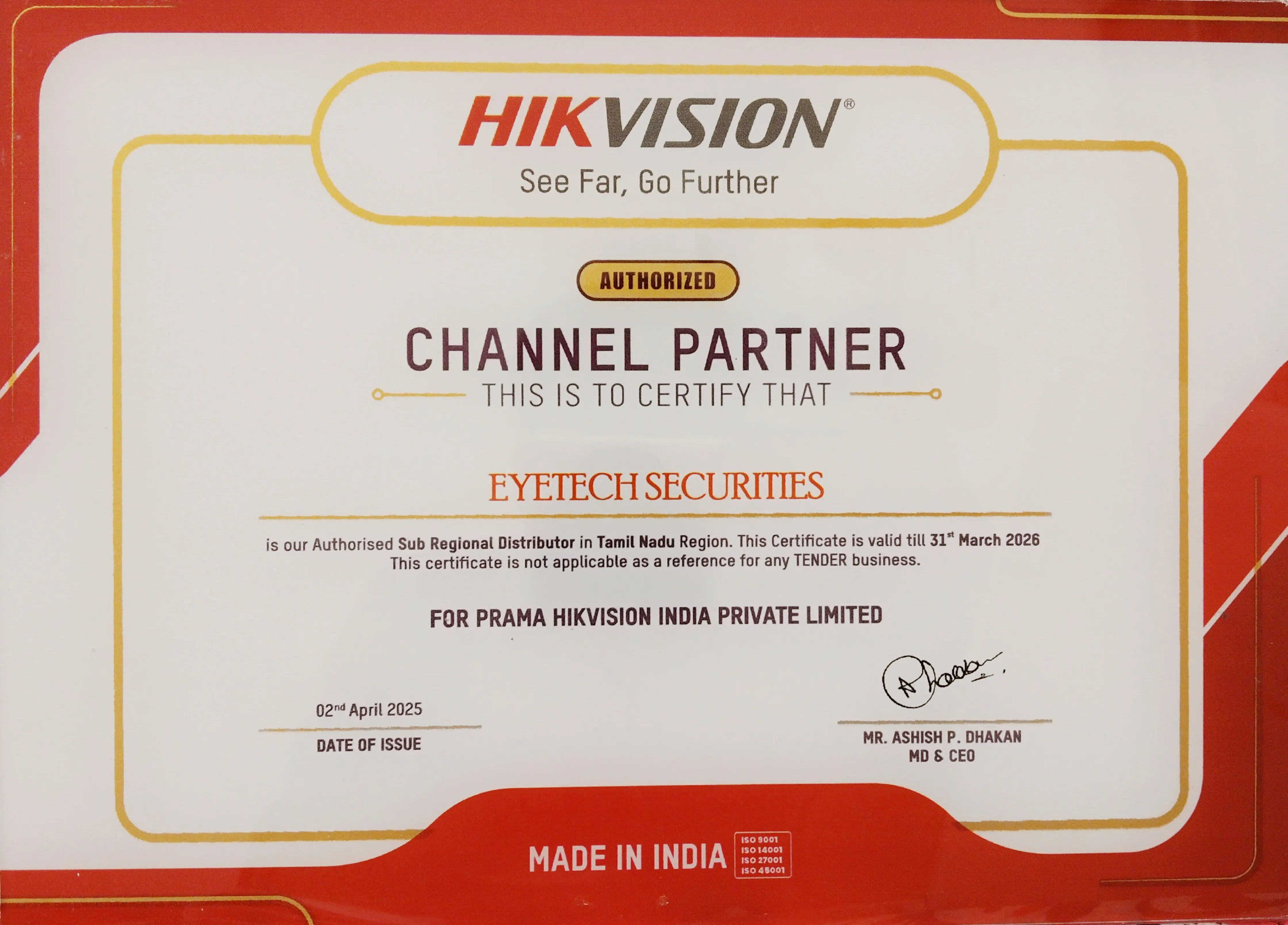
Hikvision Authorized Dealer Certificate - Eye Tech Securities
Official Hikvision Authorized Dealer Certificate

Why Trust an Authorized Hikvision Partner?

Avoid unverified third parties who attempt physical circuit shorting or motherboard chip desoldering that permanently corrupts DVR firmware. As an Authorized Partner, your system is handled strictly through certified manufacturer protocols:

Direct Manufacturer Cryptographic Tools

We generate official XML cryptographic reset files directly matched to your device serial barcode, keeping existing CCTV recordings 100% intact.

Official Hik-Connect Account Unbind Authority

Direct access to release devices locked under old installer or previous owner accounts so you can register your phone app immediately.

No Purchase Invoice Needed

You don't need to dig up old paper bills or invoices. Only a clear photograph of your hardware back label sticker is required.

100% Refund Guarantee If Not Done

Complete peace of mind. If your device cannot be reset or unbound due to unsupported hardware or firmware, 100% of your ₹450 is refunded immediately.

Mandatory Requirements

Prerequisites Checklist for Remote Resolution

Please ensure these 5 requirements are ready so our technician can complete the reset or unbind in 5–10 minutes:

1

PC / Laptop on Site

A Windows PC or laptop must be physically on the site where the DVR or camera is installed.

2

Same Local Network

The PC must be connected to the exact same Wi-Fi router or switch as your DVR/NVR.

3

Ultraviewer Access

Open the free Ultraviewer software and share your ID & Password with our technician.

Download UltraViewer (v6.6)
4

Device Label Photo (No Invoice Needed)

Send a clear photo of the barcode sticker showing Model & Serial Number to WhatsApp (9962835944). No bill or invoice required!

5

Advance Payment (100% Refundable)

Payment of ₹450 per device completed via UPI before the session. 100% refund guarantee if not resolved!

How It Works

Fast 5-Step Resolution Process

Quick, professional, and secure. Most devices are unlocked or unbound in 5–10 minutes.

1

WhatsApp Device Label Photo (No Invoice Needed)

Take a clear photo of the serial number barcode on your DVR/NVR sticker and send to 9962835944. No original bill or purchase receipt needed.

2

Complete Advance Payment (₹450 / Device)

Make payment of ₹450 via UPI (GPay / PhonePe / Paytm) and share screenshot. Backed by our 100% money-back guarantee.

3

Connect Laptop to Same Local Network

Ensure your on-site laptop is on the same router/LAN as the DVR so discovery tools detect the device.

4

Share Ultraviewer Access ID

Open Ultraviewer on your laptop and send your Partner ID and Password to our technician.

Don't have UltraViewer? Download v6.6 Setup (.exe)
5

Device Reset / Unbound in 5–10 Minutes!

Our technician executes the official reset protocol. You can immediately set a new admin password or pair your phone app.

100% Online Remote Support

Serviceable Throughout Tamil Nadu & All Over India

No physical site visit required. Our certified technicians connect remotely via UltraViewer to unlock or unbind your Hikvision surveillance system in 5–10 minutes anywhere across India.

Tamil Nadu State-Wide Support

Immediate remote resolution across all 38 districts of Tamil Nadu including Chennai, Coimbatore, Madurai, Tiruchirappalli (Trichy), Salem, Tirunelveli, Tiruppur, Erode, Vellore, Thanjavur, Dindigul, Kanchipuram, and Hosur.

Direct support in English & Tamil

Pan-India Online Coverage

Serving residential users, CCTV dealers, IT technicians, and commercial establishments across Bengaluru, Mumbai, Delhi NCR, Hyderabad, Kolkata, Pune, Ahmedabad, Kochi, and all states throughout India.

UltraViewer remote connection

Zero Travel Cost & Instant UPI

Save time and avoid waiting for local site technicians. Flat ₹450 fee payable via Google Pay, PhonePe, Paytm, or UPI from anywhere in India, backed by our 100% Refund Guarantee.

5–10 mins turnaround time

Explore More Security Solutions from Eye Tech Securities

Need on-site CCTV installation or biometric attendance machines in Chennai? Check our packages:

Home Page & CCTV Top CCTV Installers in Chennai CCTV Packages Starting from ₹10,400 with HDD Biometric Attendance Fingerprint & Face Recognition eSSL License Key Desktop from ₹1,000 • Web from ₹2,500 Biometric Admin Lock Reset eSSL & ZKTeco Admin Reset ₹750
FAQ

Frequently Asked Questions

Common questions regarding our remote password reset and unbinding service.

What are the charges and turnaround time for Hikvision password reset and Hik-Connect unbind?

The service charge is ₹450 per device (DVR, NVR, or IP Camera). Turnaround time is just 5 to 10 minutes once the remote session is connected. Payment should be made before itself prior to starting the session.

Is your Hikvision password reset and unbind service available throughout Tamil Nadu and India?

Yes, 100%! Because our technical resolution is performed completely online via UltraViewer, we serve clients throughout Tamil Nadu (Chennai, Coimbatore, Madurai, Trichy, Salem, Tirunelveli, Erode, Vellore, etc.) and all states across India. You do not need to wait for a physical technician. As long as your PC or laptop is connected to the same local network as your Hikvision DVR, NVR, or camera, our certified engineers can reset the password or unbind the device in just 5–10 minutes.

Do I need the original purchase bill or invoice?

No invoice needed! You only need to send a clear photo of the device label barcode sticker (showing the Model & Serial number) to our WhatsApp (9962835944). You do not need the original purchase receipt, invoice, or packaging.

What if the password reset or device unbind cannot be done?

We provide a 100% Refund Guarantee. If for any technical or firmware incompatibility reason your device cannot be reset or unbound during the session, your full payment of ₹450 is refunded to your account immediately with zero deduction.

My Hikvision DVR is showing "Offline" on Hik-Connect after changing my Wi-Fi router / Internet provider. Can you fix it remotely?

Yes, absolutely! When you switch your internet service provider (such as Airtel Xstream, JioFiber, ACT Fibernet, BSNL) or replace your Wi-Fi router, the local network subnet often changes (for example, from 192.168.1.x to 192.168.29.x or 192.168.0.x). Because the DVR is configured with your old gateway and IP address, it cannot access the internet and shows "Offline" on your phone app. Our certified engineers connect remotely via UltraViewer, detect your DVR on the new network, reconfigure the IP, gateway, and DNS settings, and bring your Hik-Connect status back online within 5–10 minutes. Same transparent fee applies: ₹450 per device backed by our 100% Refund Guarantee.

What is Hikvision Static IP Live Streaming and how is it better than P2P?

Standard mobile app streaming over cloud P2P can often feel sluggish, with delayed playback or spinning loading circles during busy network hours. With our Static IP Live Streaming setup, your cameras stream directly through your internet connection's Static IP address instead of relying on intermediary cloud servers. This makes camera connections noticeably faster than P2P and delivers smoother, more reliable live video on both mobile and PC.

How does your multi-branch viewing solution compare to cloud P2P or having Static IP on each branch?

Our solution uses only 1 Single Static IP at your Centralized PC Location!

Existing methods in the market have major downsides:
• Multi-branch viewing via Cloud P2P: Free cloud P2P suffers from heavy lag, frequent video buffering, low frame rate, and frequently times out when streaming multiple branch cameras simultaneously.
• Static IP on each branch: Extremely costly! It forces you to pay recurring monthly Static IP rental charges to your ISP at every single branch location (₹500–₹1,500/month per branch).

Eye Tech's Smart Solution: You only need ONE Single Static IP at your Centralized PC / Monitoring Location (e.g. Head Office or home monitoring PC). Your branch shops, clinics, or warehouses only need regular, everyday broadband or Wi-Fi internet. This delivers live camera feeds across all branches on 1 single master screen faster and smoother than P2P, while saving you massive recurring monthly ISP fees year after year.

Can you unbind a device from another Hik-Connect account remotely?

Yes. If your app displays "The device has been added to another account", we can remotely unbind it via Ultraviewer in 5–10 minutes so you can register it to your own mobile app. Same procedure and ₹450 fee apply.

Why must payment be made in advance?

Our certified engineers dedicate live technical time and generate official manufacturer cryptographic files tied to your serial number. Advance payment of ₹450 is required, and it is 100% risk-free backed by our money-back guarantee.

Will my recorded video footage be erased?

No. Resetting the password or unbinding from an old account does not touch your recordings. All recorded CCTV video footage on the hard disk drive (HDD) remains 100% safe.

Where can I download UltraViewer for remote password reset assistance?

You can directly download the official software setup file here: Download UltraViewer 6.6 (.exe). Install it on your Windows laptop or PC connected to the same network as your CCTV equipment, open the program, and share your 8-digit Partner ID and Password with our technician on WhatsApp (+91 99628 35944).

Who should I contact to get my Hikvision device reset or unbound?

Contact Eye Tech Securities directly by calling or sending WhatsApp message to +91 99628 35944.

Need Hikvision Reset, Unbind, or Fast Streaming Solutions?

Password reset, unbind, router fix, Static IP fast streaming, or multi-branch setup. Fast turnaround backed by our 100% Refund Guarantee!

WhatsApp: 99628 35944 Call: 99628 35944
Call 9962835944 WhatsApp Label Photo